Fake QR codes make for easy scams - be careful what you scan out there
by The Conversation
Proxyclick/Unsplash
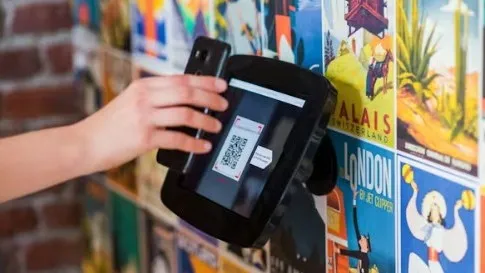
It’s a simple thing we encounter many times every single week – often while in a hurry. You pull up at a parking spot, scan a QR code and pay within seconds. Or you sit down at a cafe, scan a code to view the menu and order your meal.
Because QR codes are so widespread, scammers naturally find them appealing too. Here’s what you need to know to stay safe.
What are QR codes?
A QR (quick response) code is a type of barcode that stores information and encoded data in a square pattern of black and white pixels. They were first developed in 1994 by Japanese company Denso Wave for labelling automotive parts.
Today QR codes are widely used because they’re quick to create and easy to scan without needing a specialised scanner – a smartphone camera will do. They’re designed to remove friction: you scan, and something happens instantly.
However, a QR code doesn’t show you where it leads until after it’s scanned. Your device can perform a range of functions after scanning a QR code: open up a web page, check you in to a location, or even connect your device to a wireless network without needing to type anything.
That’s what makes it so useful, but also potentially risky. Malicious QR codes can redirect users to fake websites or prompt them to download harmful content. QR codes are so familiar and widespread, we tend to trust them without question. That’s exactly what scammers rely on.
What to look out for
Phishing – where cyber criminals “fish” for sensitive information – is the most common type of cyber crime, typically sent by email or text. When a QR code is involved, that becomes “quishing” – short for QR phishing.
Scammers now include QR codes in emails or text messages instead of clickable links. When scanned, the code directs users to fake login pages or payment sites. Because there’s no visible link, these messages can seem more trustworthy and can even bypass some email security filters.
Malicious downloads
Some QR codes don’t just take you to a website – they trigger an app or file download, which could contain malware. This can give attackers access to your device, data or accounts. Because the action happens quickly, you may not have time to question whether the download is legitimate.
Fake QR codes in public places
One of the simplest methods to trick people involves placing a sticker with a fake QR code over a legitimate one. For example, scammers have been caught sticking fraudulent QR codes on parking meters. When drivers scan the code, they are taken to a fake payment page and asked to enter their card details. Posters, flyers and other signs in public places may also contain malicious QR codes.
Redirect scams
Even when a QR code looks legitimate, it may redirect you through multiple websites before landing on a fake page. This makes it harder to detect suspicious activity. By the time you see the final page, it may look convincing enough to trust.
How to stay safe
The good news is you don’t need to stop using QR codes. You just need to use them more carefully.
Check for signs of tampering. In public places, look closely at the code. Is it a sticker placed over another one? Does anything look out of place?
Look at the web address before proceeding. Many phones now show a preview of the hyperlink retrieved via the QR code before opening it. Don’t just hit “go”, take a moment to check it looks legitimate.
Avoid scanning codes from unsolicited messages. If you receive a QR code via email or text asking you to log in or make a payment, don’t use it. Go directly to the official website instead.
Don’t rush to enter personal details. If a site asks for sensitive information, pause. Double-check you’re on the correct website.
Keep your phone updated. Security updates may sometimes feel like a nuisance, but they do help protect your device against malicious sites and downloads.
QR codes are not dangerous by themselves. They are useful tools that make everyday tasks easier. But they remove a key safety step: the ability to see where you’re going before you get there.
The next time you scan a QR code, take a second to think. In a world where scams are getting smarter, the safest habit is simple – don’t trust the code and verify where it leads.
Reference Written by Meena Jha Provided by The Conversation
※ Picks respects the rights of all copyright holders. If you do wish to make material edits, you will need to run them by the copyright holder for approval.
more from
The Conversation
The Conversation
Health insurance jargon can be frustrating and confusing – here’s how to navigate it
2026-04-11 00:00:00
The Conversation
Water conservation works, but climate change is outpacing it: Phoenix, Denver and Las Vegas offer a glimpse of the future
2026-04-11 00:00:00
The Conversation
Strongest evidence yet that vaping likely causes cancer
2026-04-09 00:00:00
The Conversation
Toxic dust from California's shrinking Salton Sea is harming children's lung growth – our study tracked the impact in 700 kids
2026-04-09 00:00:00
BEST STORIES
The Conversation
Mosquitoes carrying malaria are evolving more quickly than insecticides can kill them - researchers pinpoint how
2026-04-08 00:00:00
Street Food Guy
Struggling to Find Reliable Peptide Wholesale Suppliers Try This Solution Approach
2026-04-07 00:00:00
Knowable Magazine
What's the secret to a great cup of tea?
2026-04-10 00:00:00
The19th
Is fracking in Texas endangering a day care's children?
2026-04-08 00:00:00
Lifestyle
The Conversation
Moral metrics: Are corporate algorithms becoming our new moral authorities?
2026-04-09 00:00:00
The Conversation
Pets & their People explores the long, strange history of human‑animal companionship
2026-04-07 00:00:00
The Conversation
I hate it when other adults 'parent' my kids. What can I do?
 Proxyclick/Unsplash
 Reference